Sunday, 23 August 2020

Dell Inspiron 13 7373. P83G Fix

My Dell PC would not start. The fix is a hard reset. Which means removing the PSU. Opening the case. Powering down for 20 seconds by pressing the power on. Removing the battery and replacing it. Symptom: The battery appears drained. Plugging in PSU, then pressing ON switch the keys backlight for 1 second then it's dead again. Fix: is to do a 'hard reset'.

Get your safety gear, which means earth your body with a wrist attachment. At the very least replace any nylon clothing you're wearing with cotton. If you use reading glasses make sure you have them at hand. Remove 10 screws at the rear. The single screw in the center is slightly different to the other 9 screws around the edges. The center screw was hidden under a sticker which reads "WARRANTY VOID IF TAMPERED WITH OR REMOVED". There are no screws under the plastic 'feet'. Use thin piece of card or plasic to slowly lever out the back case. I used an old thin card train ticket did it for me. I began this at the back right (near the power button). A guitar plectrum also works but a credit card is too thick. Work along the back first, then the sides. Drain the power by holding the power button down for 15 to 20 seconds. Unscrew the battery. Unscrew 4 screws holding the battery in place, which is labelled "Type F62G0 11.4V" The fix did not work.

Dell Inspiron 13 7000 P83G Will Not Wake After Sleep

I have a model laptop listed about. I have tried the most recent BIOS update, defaulting the BIOS settings, Checking all the power settings, Installing the newest update of Intel Management Interface Engine, Disabling the Intel Management Interface, and disabling Fast Startup in settings. Turned on Wake from USB, and disabled USB Selective Sleep settings. The PC still will not wake up after entering sleep mode and must be forced shutdown and turned back on.

Sunday, 19 July 2020

GIMP keyboard shortcuts

In this list you can see most important hotkeys for the GIMP under Linux (most of them work on Windows as well). All keys can be individually assigned: File / Preferences / Interface / Hotkeys.

Help
HelpF1
Context HelpShift+F1
Toolbox
Rect SelectR
Ellipse SelectE
Free SelectF
Fuzzy SelectU
Select By ColorShift+O
ScissorsI
PathsB
Color PickerO
MoveM
Crop and ResizeShift+C
RotateShift+R
ScaleShift+T
ShearShift+S
PerspectiveShift+P
FlipShift+F
TextT
Bucket FillShift+B
BlendL
PencilN
PaintbrushP
EraserShift+E
AirbrushA
InkK
CloneC
ConvolveV
SmudgeS
Dodge/BurnShift+D
Swap ColorsX
Default ColorsD
File
New imageCtrl+N
Open imageCtrl+O
Open image as new layerCtrl+Alt+O
Duplicate imageCtrl+D
Open recent image 01Ctrl+1
Open recent image 02Ctrl+2
Open recent image 03Ctrl+3
Open recent image 04Ctrl+4
Open recent image 05Ctrl+5
Open recent image 06Ctrl+6
Open recent image 07Ctrl+7
Open recent image 08Ctrl+8
Open recent image 09Ctrl+9
Open recent image 10Ctrl+0
Save imageCtrl+S
Save under a new nameShift+Ctrl+S
QuitCtrl+Q
Dialogs
LayersCtrl+L
BrushesShift+Ctrl+B
PatternsShift+Ctrl+P
GradientsCtrl+G
Tool-OptionsShift+Ctrl+T
PalettesCtrl+P
Info windowShift+Ctrl+I
Navigation windowShift+Ctrl+N
Close the windowAlt+F4
Jump to next widgetTab
Jump to previous widgetShift+Tab
Set the new valueEnter
Activate current button or listSpace
In a multi-tab dialog, switch tabsCtrl+Alt+PgUp
Open LocationShift+L
Up-FolderAlt+ up
Down-FolderAlt+ down
Home-FolderAlt+Home
Close DialogEsc
View
Main MenuF10
Drop-down MenuShift+F10
Toggle fullscreenF11
Toggle quickmaskShift+Q
Close document windowCtrl+W
Zoom in+ or Ctrl+Mousewheel
Zoom out- or Ctrl+Mousewheel
Zoom 1:11
Shrink wrapCtrl+E
Fit image in windowShift+Ctrl+E
Toggle rulersShift+Ctrl+R
Toggle guidesShift+Ctrl+T
Edit
UndoCtrl+Z
RedoCtrl+Y
Copy selectionCtrl+C
Cut selectionCtrl+X
Copy visibleCtrl+Shift+C
Paste as new imageCtrl+Shift+V
Paste clipboardCtrl+V
Clears selectionCtrl+K
Named copy selectionShift+Ctrl+C
Named cut selectionShift+Ctrl+X
Named paste clipboardShift+Ctrl+V
Fill with FG ColorCtrl+,
Fill with BG ColorCtrl+.
Fill with PatternCtrl+:
Layers
Select the layer abovePgUp
Select the layer belowPgDn
Select the first layerHome
Select the last layerEnd
Merge visible layersCtrl+M
Anchar layerCtrl+H
Selections
Toggle selectionsCtrl+T
Select allCtrl+A
Select noneShift+Ctrl+A
Invert selectionCtrl+I
Float selectionShift+Ctrl+L
Path to selectionShift+V
Plug-ins
Repeat last plug-inCtrl+F
Reshow last plug-inShift+Ctrl+F

Sunday, 23 February 2020

Dell Inspiron - Locked out due to BitLocker

I recently made some tiny changes to my Dell Inspiron BIOS. Silly me. Computer would not reboot. It demanded I enter a 48-digit BitLocker key. It was news to me I'd encrypted the drive with BitLocker. It's not something I'd naturally do because I'd expect to turn the laptop into a dual boot Windows/Linux, and I'm not sure Linux can understand BitLocker. Given I don't remember switching BitLocker on, I guess I must've bought it with BitLocker already installed.

It seems changing the BIOS activates the security system. The solution to the issue is:

  1. You're looking at a blue screen demanding you enter your BitLocker key:
  2. Click “Skip this drive”
  3. Click “Troubleshoot”
  4. Click “Advanced Options”
  5. Click “UEFI Firmware Settings”
  6. Click “Restart” – You will restart and enter the BIOS for your computer. The BIOS interface is different for every computer. In my case, it looked nothing like in the above video, and doing subsequent steps in the above video did not work. Doing the following DID work:
  7. Click “Restore Settings” button on the bottom of the Dell BIOS screen. Also see here if this setting is not evident.
  8. Click Restore “Factory Defaults”
  9. Save settings and the computer will reboot. In my case, BitLocker prompt screen is now gone and Windows boots normally.

Tuesday, 12 March 2019

[ReactiveUI] Bind enum to Radio button list using a ListBox

This is an incomplete blog. The code is broke. It's the code I wrote out to ask a technical question. As often I figured it out when I wrote it all out clearly! I've yet to put the corrected code in here! I found it in an editor tab. Rather than toss it away I'll put the working version here. Because the errors I got when it was broke are nested exceptions, which are themselves cryptic.

When your radio buttons depend on something like a enum or a class.

I have a ListBox of RadioButtons and want the Selected RadioButton to bubble up such that the ListBox SelectedItem is the one clicked. Can't see what I'm doing wrong.

View:

  <ListBox x:Name="lstRecordTypes">
    <ListBox.ItemContainerStyle>
      <Style TargetType="{x:Type ListBoxItem}">
        <Setter Property="Template">
          <Setter.Value>
            <ControlTemplate TargetType="{x:Type ListBoxItem}">
              <RadioButton 
                    Content="{Binding Display}"
                    ToolTip="{Binding Display}"
                    IsChecked="{Binding RelativeSource={RelativeSource TemplatedParent},Path=IsSelected}"/>
            </ControlTemplate>
          </Setter.Value>
        </Setter>
        <Setter Property="Margin" Value="5"/>
      </Style>
    </ListBox.ItemContainerStyle>
  </ListBox>
        public MyView()
        {
            InitializeComponent();
            this.WhenActivated(disposables => this.BindControls(disposables));
        }

        private void BindControls(CompositeDisposable disposableRegistration)
        {
            this.WhenAnyValue(v => v.ViewModel).BindTo(this, v => v.DataContext).AddTo(disposableRegistration);

            this.OneWayBind(ViewModel, vm => vm.RecordTypes,  v => v.lstRecordTypes.ItemsSource)
                .DisposeWith(disposableRegistration);
            this.Bind(ViewModel, vm => vm.SelectedRecordType, v => v.lstRecordTypes.SelectedItem)
                .DisposeWith(disposableRegistration);
            this.BindCommand(ViewModel, vm => vm.SetRecordIndex,
                                              v => v.lstRecordTypes,
                                              nameof(lstRecordTypes.SelectionChanged));
 }

ViewModel:

        private IReactiveList<MyRecordEnumLookup> _recordTypes;
        public IReactiveList<MyRecordEnumLookup> RecordTypes
        {
            get { return _recordTypes; }
            set { this.RaiseAndSetIfChanged(ref _recordTypes, value); }
        }
        
        private MyRecordEnum _selectedRadioRecordType;
        public MyRecordEnum SelectedRadioRecordType
        {
            get { return _selectedRadioRecordType; }
            set { this.RaiseAndSetIfChanged(ref _selectedRadioRecordType, value); }
        }

        public void LoadRecordTypes()
        {
            // Convert a list of enums into a ReactiveList
            var list = ((IList<MyRecordEnum>)Enum.GetValues(typeof(MyRecordEnum)))
                          .Where( e => e != MyRecordEnum.Undefined)
                          .Select(e => new MyRecordEnumLookup(x));

            RecordTypes = new ReactiveList<MyRecordEnumLookup>();
            RecordTypes.AddRange(list);
        }

        public Int32 _selectedRecordTypeInt { get; set; }   // Valid range = 1..5; 0 = Undefined
        public MyRecordEnum SelectedRecordType              // Defaults to Undefined
        {
            get { return (MyRecordEnum)this._selectedRecordTypeInt; }
            set { this._selectedRecordTypeInt = (Int32)value; }
        }

[ReactiveUI] Test command

Testing ReactiveUI Commands is almost screaming Tell don't Ask at you.

I suppose may want to set a state on completion of the method invoked when executing the Command. e.g. DoExitViewModel(), in the example. But only do this when the view needs to know a result. In this example you would've Disposed() any ViewModel dependencies; so the View can now close itself.

Do not set a property in the ViewModel just so that you test whether production code successfully completed. Use Tell Don't Ask instead.

Commands can rarely send data from the View to ViewModel. When a ViewModel needs to know under what state a Command was invokde, one would normally set a property before invoking a Command. In contrast, when the view needs to know a result, I'll always try to return that result to the view from the method executing in the ViewModel.

 public partial class MyView : Window, IViewFor<MyViewModel>
 {

    public static readonly DependencyProperty ViewModelProperty =
        DependencyProperty.Register("ViewModel", typeof(MyViewModel)
                                               , typeof(MyView));

    public MyViewModel ViewModel
    {
        get { return (MyViewModel)this.GetValue(ViewModelProperty); }
        set { this.SetValue(ViewModelProperty, value); }
    }

    object IViewFor.ViewModel
    {
        get { return this.ViewModel; }
        set { this.ViewModel = (MyViewModel)value; }
    }

    public partial class MyView()
    {
        InitializeComponent();
        this.WhenActivated(disposables => this.BindControls(disposables));        
    }
    
    private void BindControls(CompositeDisposable disposableRegistration)
    {
        this.WhenAnyValue(v => v.ViewModel)
            .BindTo(this, v => v.DataContext)
            .AddTo(disposableRegistration);

        this.BindCommand(this.ViewModel, vm => vm.ExitView,
                                          v => v.btnExit)
            .AddTo(disposableRegistration);

        this.ViewModel.ExitView.Subscribe(success => { if (success) this.Close(); });

        this.WhenAnyObservable(v => v.ViewModel.BarcodeScanned)
            .Subscribe(authenticationType => this.ShowAuthentication(authenticationType));


    }
}

public class MyViewModel
{
    public ReactiveCommand<Unit, bool> ExitView { get; private set; }            // Output to view
    public ReactiveCommand<Unit, CRUDResult> AddTemplate { get; private set; }   // Output
    public ReactiveCommand<string, AuthenticationTypes?> BarcodeScanned { get; } // Input from view + Output
    public ReactiveCommand<Unit, Unit> Boring { get; }                           // No input/output from/to view

    public IObservable<bool> CanAddTemplate { get; private set; }

    public MyViewModel()
    {

        this.CanAddTemplate = (this).WhenAnyValue(vm => vm.PageState, (EditState status) => status == EditState.Browse);
        
        this.AddTemplate = ReactiveCommand.Create(() => this.DoAddTemplate(), this.CanAddTemplate);
        this.BarcodeScanned = ReactiveCommand.Create<string, AuthenticationTypes?>(barcode => this.DoBarcodeScanned(barcode));
        this.ExitView = ReactiveCommand.CreateFromTask(async () => await Task.Run(() => this.DoExitViewModel()));
    }
    
    public bool DoExitViewModel()
    {
        // Dispose the ViewModel
        return true;
    }

    private CRUDResult DoAddTemplate()
    {
        // Do whatever you do
        this.PageState = EditState.Add;
        return new CRUDResult(null);
    }
    
    private AuthenticationTypes? DoBarcodeScanned(string barcode)
    {
        return null;
    }

}

public class MyViewModelTests
{
    [Test]
    public void Add_Button_Test()
    {
        // Arrange
        var vm = new MyViewModel();
        vm.Setup(0);
        EditState expectedStatus = EditState.Add;
        
        CRUDResult resultPage = new CRUDResult(null);

        // Act
        vm.AddTemplate.Subscribe(tf => resultPage = tf);
        vm.AddTemplate.Execute().Subscribe();

        // Assert
        Assert.AreEqual(expectedStatus, vm.PageState);
        Assert.AreEqual(null, resultPage.Message);
    }
}

Wpf custom dictionary. Notes

Wpf uses #LID to indicate the language or dialect of the dictionary which it will pick up from the current localization.

e.g.
#LID 2057 = UK location

Must include

  1. the System namespace in xaml,
  2. SpellCheck.IsEnabled="True" in the control,
  3. location of the dictionary.

Best set build action of the dictionary to embedded resource.

<Window ...
  xmlns:sys="clr-namespace:System;assembly=System">
  <!-- Must include System namespace in xaml -->

  <TextBox SpellCheck.IsEnabled="True">
    <SpellCheck.CustomDictionaries>
      <!-- List of dictionaries to use -->
      <!-- hard-coded -->
      <sys:Uri>c:\pathToDictionary\uk.lex</sys:Uri>
      <!-- OR: Embedded resource -->
      <sys:Uri>pack://application:,,,/MyWpfProject;component/uk.lex</sys:Uri>
      <!-- Must set uk.lex  Build Action = Embedded Resource -->
    </SpellCheck.CustomDictionaries>
  </TextBox>

MyWpfProject - being the name of the application, in this example.

Tuesday, 26 February 2019

[ReactiveUI] Bind a list of enums to WPF combo

Originally posted by: Mitkins, at: Oct 12 '17 at 0:22, at stackoverflow. I edited it to correct minor typos in the original. And to make one of two alterations.

I am trying to find a simple example where the enums are shown as is. All examples I have seen tries to add nice looking display strings but I don't want that complexity. Note: EffectStyle is just an enum.

public enum EffectStyle { Undefined = 0, Yes = 1, No = 2 }

Basically I have a class that holds all the properties that I bind, by first setting the DataContext to this class, and then specifying the binding like this in the xaml file:

<ComboBox ItemsSource="{Binding Path=EffectStyle}"/>

But this doesn't show the enum values in the ComboBox as items.


Using ReactiveUI, I've created the following alternate solution. It's not an elegant all-in-one solution, but I think at the very least it's readable.

In my case, binding a list of enum to a control is a rare case, so I don't need to scale the solution across the code base. However, the code can be made more generic by changing EffectStyleLookup.Item into an Object. I tested it with my code, no other modifications are necessary. Which means the one helper class could be applied to any enum list. Though that would reduce its readability - ReactiveList<EnumLookupHelper> doesn't have a great ring to it.

Using the following helper class:

public class EffectStyleLookup
{
    public EffectStyle Item { get; set; }
    public string Display { get { return Item.ToString();} }

    public EffectStyleLookup(){ }

    public EffectStyleLookup(EffectStyle item)
    {
        this.Item = item;
    }
}

Yes. I prefer using constructors. All things considered, you write less code.

In the ViewModel, convert the list of enums and expose it as a property:

public MyViewModel : ReactiveObject
{
  private ReactiveList<EffectStyleLookup> _effectStyles;
  public ReactiveList<EffectStyleLookup> EffectStyles
  {
    get { return _effectStyles; }
    set { this.RaiseAndSetIfChanged(ref _effectStyles, value); }
  }

  // See below for more on this
  private EffectStyle _selectedEffectStyle;
  public EffectStyle SelectedEffectStyle
  {
    get { return _selectedEffectStyle; }
    set { this.RaiseAndSetIfChanged(ref _selectedEffectStyle, value); }
  }

  public MyViewModel()
  {
    this.LoadEffectStyleCombo();
  }

  private void LoadEffectStyleCombo()
  {
    // Convert a list of enums into a ReactiveList
    var xs = ((IList<EffectStyle>)Enum.GetValues(typeof(EffectStyle)))
                  .Select( x => new EffectStyleLookup(x) );

    EffectStyles = new ReactiveList<EffectStyleLookup>();
    EffectStyles.AddRange(xs);
  }
}

In the ComboBox, utilise the SelectedValuePath property, to bind to the original enum value:

<ComboBox x:Name="cboEffectStyle" DisplayMemberPath="Display" SelectedValuePath="Item" />

In the View, this allows us to bind the original enum to the SelectedEffectStyle in the ViewModel, but display the ToString() value in the ComboBox:


public MyView()
{
    InitializeComponent();
    this.WhenActivated(disposables => this.BindControls(disposables));
}

private void BindControls(CompositeDisposable disposableRegistration)
{
    this.OneWayBind(ViewModel, vm => vm.EffectStyles, v => v.cboEffectStyle.ItemsSource).DisposeWith(disposableRegistration);
    this.Bind(ViewModel, vm => vm.SelectedEffectStyle, v => v.cboEffectStyle.SelectedValue).DisposeWith(disposableRegistration);
}

Thursday, 28 June 2018

[ReactiveUI] Auto Complete Incremental Search?

A Winforms UserControl had an incremental search TextBox and a list. A detail view is set from the selected value in the list. This works when I click on a particular list item.

I want to get the last string value from the incremental AutoCompleteSearch TextBox too. To fire a command and also set the user in the Detail view. But:

 Couldn't find a Command Binder for System.Windows.Forms.AutoCompleteStringCollection 

listUsers is the compound UserControl with a property SearchAutoCompleteCustomSource:

    public AutoCompleteStringCollection SearchAutoCompleteCustomSource
    {
        get { return tbAutoCompleteSearch.AutoCompleteCustomSource; }
        set { tbAutoCompleteSearch.AutoCompleteCustomSource = value; }
    }

MyView:

    this.BindCommand(this.ViewModel, vm => vm.UserToFind,
                                      v => v.listUsers.SearchAutoCompleteCustomSource);

MyViewModel:

private readonly ReactiveCommand userToFind;
public ReactiveCommand UserToFind => this.userToFind;

public MyViewModel()
{
    this.userToFind = ReactiveCommand.Create(userName => this.SetUserSelected(userName));
}

private bool SetUserSelected(string userName)
{
    User user = userManager.GetUserByName(userName);
    bool userFound = (user != null);

    if (userFound)
    {
        SetDetailView(user);
    }
    return userFound;
}

Saturday, 13 May 2017

Epub3 conversion notes.

(1) I found this list of epub2 to epub3 conversion notes

Notes below are mine, with typical error messages returned by epubcheck validation.

(2) 'Exactly one manifest item must declare the 'nav' property (number of 'nav' items: 0).'

For Epub 3, this means you need a table of contents in an xhtml file. An ebook often comes with an html "table of contents".

You should convert it to the required format. See the example below.

Your table of contents should look something like this:

    <nav epub:type="toc" id="toc">
        <ol id="nav">
            <li><a href="chapter01.xhtml#myId">Some entry</a></li>
            <li><a href="chapter02.xhtml#myOtherId">Some other entry</a></li>
              ...
        </ol>
    </nav>

The <nav> tag is a special epub tag, so the html tag, it sits in, needs another namespace to tell it what a <nav> is:

    <html xmlns="http://www.w3.org/1999/xhtml"
          xmlns:epub="http://www.idpf.org/2007/ops"
          xml:lang="en">

Last: The <ol> tags inside your <nav> entry must not be nested (in more <ul>, or <ol> lists. One flat list only. You must use an <ol> list. <ul> not allowed.

So give this ol a style in your stylesheet. To knock out the numbers:

    ol#nav { list-style-type: none; }

In an example where "p2.xhtml" has a table of contents, .opf entry changes from:

    <item id="toc" media-type="application/xhtml+xml" 
          href="toc.xhtml" />

to:

    <item id="toc" media-type="application/xhtml+xml" 
          href="toc.xhtml" properties="nav"/>

[ PS: if you also have an svg file, add properties="svg" to that in the .opf too! ]

Pesky epub3!

Monday, 24 April 2017

Locating an element to test with FlaUI

The WinForms application I'm trying to test is legacy in more ways than I'd like.

Here is FlaUI Inpect looking at a login form I want to test. I need access to 4 items. Each has an AutomationId. The ids are: textUser, textPINCode, buttonHalt, buttonLogin

These 4 controls are custom controls derived from Krypton controls. I think the Krypton controls derive from Windows Forms 2.0

Suppose I have a handle on the top level window ("FormSplashScreen"). What is the XPath to get one of the 4 I want (say textUser)?

Thursday, 6 April 2017

AOP - Aspect Oriented Programming

Aspect-oriented programming was first described 20 years ago due to work of a team led by legendary programmer Gregor Kiczales [who also co-authored the book "The Art of the Metaobject Protocol" ]

What is it?

AOP aims to eliminate the noise of cross-cutting concerns, CCC, by putting them all in one place while still allowing the code previously "tangled" up with CCC to work just as before. The business logic is clearer, easier to read and maintain.

AOP concepts

  • cross-cutting concern, CCC: Is code which applies all over the place and often relates to getting an application to work rather than to any business concern. It cuts across an application. e.g. authentication, logging, exception handling, caching data, wrapping a transaction around something, auditing, ...
  • join point - a place in code where it can be 'cut', joined to, or intercepted. e.g. just before I call svc.SaveName()
  • Pointcut - a set of join points. e.g. just before any SaveName() method in project UI is called.
  • advice - some code to be applied by AOP
  • aspect - a combination of Pointcuts with advice
  • tangling - when CCC(s) are mixed with business or core logic like spaghetti such that the core logic is confusing to read.
  • scattering - having CCCs in multiple methods and classes
  • weaving - how AOP applies aspects to core logic.

Potential applications for ApoG

  • Authentication and Authorization : by putting this all together in one place the problem of security is not confused with other business logic.
  • Data caching
  • Exception handling - hopefully including all unhandled exceptions. ApoG currently has 991 exceptions.
  • Logging - There are over 2000 of these
  • Transaction wrap-around e.g. to save a unit of work. ApoG currently does not have unit of work transactions but these will be needed in future.
  • Auditing? - i.e. The process of saving PDF files and entries to the database can be put in one place.

Advantages

  • Cleaner code
  • DRY - It applies Don't repeat yourself. It reduces code duplication
  • SRP - It applies the Single Responsibility Principle. Ensures a method or class does only one job.
  • Readability is improved - because one can read the core logic without being distracted by the CCCs
  • Maintenance is easier - because code relating to a CCC is in only one place it is easier to update. Because core logic is cleaner and uncluttered by tangential concerns it is easier to change just the core logic without interfering with anything else.
  • Money is no object because every AOP tool but one is free. Dozens of AOP tools have been written.

Disadvantages

  • ????

Software

Top 20 AOP tools

Interception, code. License: MIT OSS

NConcern: Is a relative newcomer. License: OSS

PostSharp: This has been the main .net AOP package since it arrived on the scene. License: Commercial software. Licenses are up to £449 per developer for a lifetime license. Limited licences are less. Not so expensive. Consider: If AOP improves productivity by 5%, the saving is at least £2500 per year, when one considers the average annual cost of a programmer is certainly over £50k/year. PostSharp Express is free but limited.

Training:

More articles:

AOP with the RealProxy Class | Principles of AOP, from 2015

Examples

Also see book listed above: AOP in .net. Although it may look like many AOP packages are not well documented, they often use similar implementation patterns. Like dependency injection, once one understands the principle, changing tools is relatively easy.

Thursday, 9 February 2017

F-sharp books.

TitleLevelAuthorsPublisherDatePagesComment
Learn F# (MEAP)IntroIsaac AbrahamManningApr-2017400
Real-World Functional Programming with examples in F# and C#Tomas Petricek with Jon SkeetManningDec-2009560
Beginning F# 4.0Robert Pickering, Kit EasonApress2016309
Friendly F# (Fun with game programming)Costantini, Giulia & Maggiore, GiuseppeO'ReillyAug-2011191
F# SuccinctlyFreeRobert PickeringSyncfu-sion201296Free
Analyzing and Visualizing Data with F#Tomas PetricekO'ReillyOct-201547Free, from publisher
FSharp Specification 4.0Fsharp FoundationFsharp Founda-tion365Free, Not really a book but can be published as such
F# Web ProgrammingCommunity for F#GitBookFree. Not really a book because it's just a set of hints!
F# Survival GuideJohn Puopolo, Sandy SquiresCTO Corner2012171Free.
Suave Music Store example77
The Book of F#Interm-ediateDave FancherNo Starch PressMar-2014312
Professional F# 2.0Ted Neward Aaron, C. Erickson, Talbott Crowell, Richard MinerichWrox2011434
Programming F-sharp 3.0, 2eChris SmithO'ReillyOct-2012476
Testing with F#Mikael LundinPacktFeb-2015286
F# for DevelopersTao LiuMicro-soft2013619
Windows Phone 7.5 Application Development with F#Web / mobileLohith G.N.PacktApr-2013138
Building Web, Cloud, and Mobile Solutions with F#Daniel MohlO'ReillyNov-2012176
F# Applied, A practical guide to Web dev in F# using SuaveTamizhvendan S201696link
Expert F# 4.0ExpertDon Syme, Adam Granicz & Antonio CisterninoApress20155824 editions of this book
F# High PerformanceEriawan KusumawardhonoPacktJan-2017338
Mastering F#Alfonso García-Caro Núñez, Suhaib FahadPacktNov-2016264
F# 4.0 Design PatternsGene BelitskiPacktNov-2016318
F# for Quantitative FinanceJohan AstborgPacktDec-2013286
F# 4.0 Programming CookbookKevin AshtonPacktAug-2017371
F# Deep DivesEdited by Tomas Petricek, Phillip TrelfordManningDec-2014372
F# for Machine Learning EssentialsMachine LearningSudipta MukherjeePacktFeb-2016194
Machine Learning Projects for .NET DevelopersMathias BrandewinderApress2015300
Learning F# Functional Data Structures and AlgorithmsCompu-ter sciencyAdnan MasoodPacktJun-2015206
Fsharp for ScientistsJon D HarropWiley2008334
F# for Technical ComputingJon D HarropFlying frog2010279
Programming Language ConceptsPeter SestoftSpringer2012278
Functional Programming Using F#Michael R. Hansen, Hans Rischel CUPMay-2013372

Of interest. Maybe watch/read

Friday, 28 October 2016

VS code, asp.net core. Microsoft on all 3 platforms.

Microsoft are writing tools to develop and publish their applications on all 3 platforms. asp.net core is a slimmed down open source asp.net with web forms mercifully removed. Visual Studio code is a lightweight (by Microsoft standards), programming editor. It's cross platform (iOS, Linux, Win) and not too fat. The setup file I downloaded was 32Mb, taking 133.6Mb of disk space. It installed seriously fast (compared with other dev software from Microsoft).

I suppose this is a virtue of giving geeks more control over the development side. They will actually write tools for authoring software on any and every platform. There is presumably a Chrome version in the works too? Any application written should be portable across platforms with ease. It's a completely different philosophy from what we've been used to.

This blog is just a log of Shawn Wildermuth's long (> 9 hours) Pluralsight course "Building a Web App with ASP.NET Core, MVC 6, EF Core, and Angular", as I acquaint myself with the latest version. So much of it is command line driven, I feel I should write it down to remind myself what to do next time.

Entering code . from the command line executes VScode at lightning speed. e.g.

F:\code\CSharp\HelloWorld>code .

It loads with the project in that folder "HelloWorld", but without intellisense or coloration because each individual language must have support added separately. To add C# support, Ctrl+Shift+X shows a list of extensions, from which I selected C#. Added it, enabled it, the code editor restarts in less than a second. VSCode does not create projects like full Visual Studio. We need to use nodejs and npm for that. My copies of these two were quite old.

F:\code\CSharp\HelloWorld>node --version v4.4.3 F:\code\CSharp\HelloWorld>npm --version 2.15.1

So I installed a new nodejs from nodejs.org, which seemed to take forever! Snooze. Waking up several minutes later I do:

F:\code\CSharp\HelloWorld>node --version v6.9.1 F:\code\CSharp\HelloWorld>npm --version 3.10.8

Now, I'm happier creating a new project from the command line using yoeman, after first installing yoeman (with the global option), the asp.net generator is also installed

F:\code\CSharp\HelloWorld>npm install yo -g F:\code\CSharp\HelloWorld>npm install generator-aspnet -g

Now I will generate an asp.net application. First moving up a level out of my current project.

F:\code\CSharp\HelloWorld>cd.. F:\code\CSharp>yo aspnet

We see a command line menu system:

? What type of application do you want to create? (Use arrow keys) > Empty Web Application Empty Web Application (F#) Console Application Console Application (F#) Web Application Web Application Basic [without Membership and Authorization] Web Application Basic [without Membership and Authorization] (F#) (Move up and down to reveal more choices)

Pick "Web Application". If the command arrows are not working just enter the number for that choice ( 5 ) Select the Bootstrap option and call it FunWithYo

navigate to it.

F:\code\CSharp>cd FunWithYo F:\code\CSharp\FunWithYo>dir

Attempting to run it at this stage shows it's still missing asp.net. So we must restore it, before running it.

F:\code\CSharp\FunWithYo>dotnet restore F:\code\CSharp\FunWithYo>dotnet run

The whole can be seen in a browser on port 5000 localhost:5000

My frist asp.net core MVC application up. Ctrl+c (from the command line, where it is running) stops it.

Once the new project is complete, code ., opens VS code with the current project loaded. We need to answer Yes to the question
Required assets to build and debug are missing from your project. Add them?

Wednesday, 16 March 2016

Programming Languages and programming

There are probably five main styles of programming, which may overlap, and often relate to particular languages. We have imperative, declarative, object oriented, functional and logic programming styles. These are more commonly called programming paradigms than styles. The list below has each style with an iconic sibling language to implement it.

  • imperative - C, or BASIC
  • declarative - SQL
  • object oriented - Smalltalk
  • functional - Haskell
  • logic - Prolog

Imperative programming begins with the 3 rules of coding: sequence (code executes left to right, top to bottom), selection (if, case) and iteration (loops), and may develop to structured programming. There's something very low level and intuitive about imperative programming but the best programming is rarely done in this style. With imperative programming, our code explains how a problem is solved - the solution can often be understood by tracing through the steps in the code. Imperative code often has a closer relationship to machine code than other styles.

With declarative programming, one declares a statement or code block to solve a problem. Declarative features are generally higher level. We see declarative features in SQL, many functional and logic programming languages.

Object oriented (OO) programming began in the late 1960s, cumulating in Smalltalk (Alan Kay: 1970 to 1980) and design patterns (1990s through to the noughties). 1980s onward saw several post-Smalltalk languages implementing OO features: C++, Java, C#, Javascript. These four now dominate the world of code. Yet your OO-purest is a Smalltalk coder at heart!

Functional programming (FP) began in academia. Elements of LISP (Designed by John McCarthy, 1958) are functional, Robin Milner created ML in 1975. 1980s saw a commercial FP language: Miranda (David Turner). Haskell began in 1987, mostly as a copy of Miranda, ever refining itself, yet staying lean and clean. Modern functional programming stresses, functions as "first class" elements of the language, declarative programming, prefers immutable data. Other commercial FP languages are: OCaml, F#, Scala, Clojure, ...

Logic programming languages began in earnest in the early 1970s with Prolog. Coding styles are very declarative and applications often have an AI basis, data analysis or both.

All these styles mix, to some extent, in actual languages in use. Yet a language is classified with the style which is most important to it. For example we call Scala a functional programing language, even though it is very OO too. Javascript has always had functional features but does not have immutable data. There's even a style called functional Javascript. Yet Javascript will always be an OO language first.

I began this in response to a question : what programming language should one learn first? It's not really a sensible question. You should learn each of the programming language styles, and sub-styles. [e.g. sub-styles: structured programming as a sub-style of imperative programming, design patterns as a sub-style of object-oriented programming, They are not really sub-, but more like meta-, or supra-styles]. We can also recognize certain idioms that span all styles: DRY, SOLID, ... A lot of good coding practices seem orthogonal to implementing specific use cases. You could begin with imperative programming (first six books in list below), and apply the wisdom in the books to your code. Object-oriented languages dominate business, so read books 7 to 12, but only 12 is specific only to OO (in a sense). Finally, you need at least some functional programming and the last two are good starters.

Beginner programmer reading list.

TBH, A beginner can begin with any programming, or programming language book. Yet you won't really have graduated from beginner until you've read most of the 14 books below. Read and apply the lessons of all 14 and you're past beginner/junior programmer level.

  1. Code Complete: A Practical Handbook of Software Construction, 2nd Edition, by Steve McConnell
  2. The Art of Readable Code, by Dustin Boswell and Trevor Foucher
  3. Programming Pearls (2nd Edition), by by Jon Bentley
  4. 97 Things Every Programmer Should Know, by by Kevlin Henney
  5. Clean Code: A Handbook of Agile Software Craftsmanship, by Robert C. Martin
  6. Test Driven Development: By Example, by Kent Beck
  7. Agile Principles, Patterns, and Practices in C#, by Robert C. Martin and Micah Martin
  8. Refactoring: Improving the Design of Existing Code, by by Martin Fowler
  9. Working Effectively with Legacy Code, by by Michael Feathers
  10. Growing Object-Oriented Software, Guided by Tests, by Steve Freeman and Nat Pryce
  11. Agile Java: Crafting Code with Test-Driven Development, by Jeff Langr
  12. Object Design: Roles, Responsibilities, and Collaborations, by Rebecca Wirfs-Brock and Alan McKean
  13. Programming in Haskell, by Graham Hutton
  14. The Joy of Clojure, 2nd Edition, by Michael Fogus and Chris Houser

Tuesday, 24 November 2015

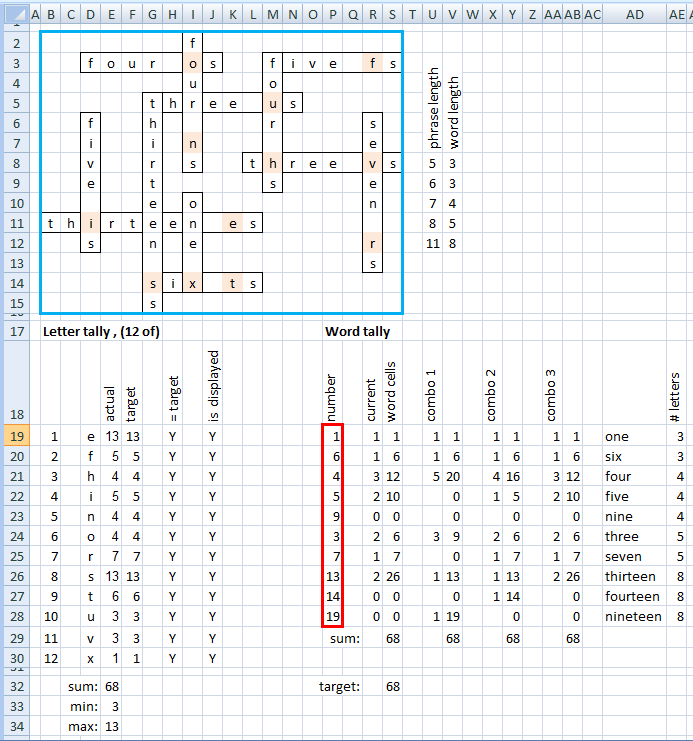
The crossword that counts itself

I love puzzles. This is described by Alex Bellos at the Guardian.

It helps to write a spreadsheet to solve this.

  1. Set the column widths to be about the same as the height, making them look square.
  2. Draw out the puzzle by highlighting a phrase (there are 12 "phrases"), and formatting: format cells, borders, click outline, OK.
  3. Repeat for each of the other 11 phrases, highlight, Ctrl-Y (repeats the last format command for a new area)
  4. Count the lengths of the rectangles (these are "phrase length"), subtract (3 or 2) to get "word length"
  5. The area inside the blue box is named "puzzle"
  6. The formula (row 20) for "actual" is: = SUMPRODUCT( LEN(puzzle) - LEN( SUBSTITUTE(puzzle,"e","") ))
  7. This formula is copied for the 11 rows below and the letter edited, each time.
  8. The formula for "= target" is: =IF( E20 = F20, "Y", "N")
  9. When they all show "Y", the puzzle is solved.
  10. The sum in cell e32 just tallies the 12 "actual" numbers. It must eventually show 68 when the puzzle is solved
  11. The working between p18 : ae32 allows one to count the number of times each number word is used and tally them (must be = 68 too)
  12. The cells bordered in red are named: number
  13. The "word cells" formula is just: = number * R19
  14. This formula is copied down and across (to the 3 combos). The "3 combos" show the 3 possible combinations of possible words.
  15. The "# letters" fomula is just the length of the number. e.g.: = LEN( AD20 )

This is not so easy to solve using purely coded program, because the rules to narrow down the combinations are not so clear. After you've figured out what constraints must be met it, no doubt, becomes much easier to program.

Tuesday, 10 November 2015

Code spippets - Fsharp

GistBox Clipper

Clipper is the companion Chrome extension to GistBox. It allows users to create Gists from:

  • Example code blocks
  • Highlighted text
  • Any page on the web
Install Chrome Extension
http://www.gistboxapp.com/clipper-tutorial/
Enter keyboard data, via console, with validation.
/// Read a valid age (between 0 and 150) from key input let readage (person: string) = let mutable continueLooping = true let mutable age = 0 while continueLooping do Console.WriteLine("Enter {0}'s age (between 0 and 150): ", person) let canparse, keyin = Int32.TryParse(Console.ReadLine()) age <- keyin if canparse && age >= 0 && age < 151 then continueLooping <- false age

Code snippets - css

Lists, without indents, with buttons, and over-handing firstline
ul { list-style: disc outside none; margin-left: 0; padding-left: 1em; } ul.circle { list-style-type: circle; } /* for lists within lists */ li { padding-left: 0.5em; }
pre :- with CR wrapping a line
pre { white-space: pre-wrap; /* css-3 */ white-space: -moz-pre-wrap; /* Mozilla, since 1999 */ white-space: -pre-wrap; /* Opera 4-6 */ white-space: -o-pre-wrap; /* Opera 7 */ word-wrap: break-word; /* Internet Explorer 5.5+ */ }

Thursday, 25 June 2015

Snippet: Searching web pages.

The idea's from Professional F# 2.0, Chapter 17 (by Ted Neward, Aaron C. Erickson, Talbott Crowell, Richard Minerich). Because there are 4 of them I'll call them the fgang of four, or FoF. When searching a dropdown list via a form, a web page form may return a value or nothing at all. F# handles nothing at all with None. Suppose our database data contained:

type VacationLocation =
    { Name: string; Pop: int; Density: int; Nightlife: int }
let destinations =
    [ { Name = "New York"; Pop = 9000000; Density = 27000; Nightlife = 9 }
      { Name = "Munich"; Pop = 1300000; Density = 4300; Nightlife = 7 }
      { Name = "Tokyo"; Pop = 13000000; Density = 15000; Nightlife = 3 }
      { Name = "Rome"; Pop = 2700000; Density = 5500; Nightlife = 5 } ]

Our web page filters user selections by city name, population, population density, and night life. A user will often ignore a selection. So each selection will be an option. A first iteration of F# can handle it likewise, using the identity function id:

let getVacationPipeline nightlifeMin sizeMin densityMax searchName =
    match nightlifeMin with
    | Some(n) -> List.filter (fun x -> x.Nightlife >= n)
    | None -> id
    >> match sizeMin with
       | Some(s) -> List.filter (fun x -> x.Pop / x.Density >= s)
       | None -> id
    >> match densityMax with
       | Some(d) -> List.filter (fun x -> x.Density <= d)
       | None -> id
    >> match searchName with
       | Some(sn) -> List.filter (fun x -> x.Name.Contains(sn))
       | None -> id

This function is applied to the data like so:

let applyVacationPipeline data filterPipeline =
    data
    |> filterPipeline
    |> List.map (fun x -> x.Name)

with filterPipeline a general function to be applied for the where clause. The last line is the select clause.

let myPipeline = getVacationPipeline (Some 5) (Some 200) (Some 8000) None
applyVacationPipeline destinations myPipeline

This match ... with ... some ... None -> id is repetitive, so we abstract it out as a getFilter function. It becomes:

let getVacationPipeline2 nightlifeMin sizeMin densityMax searchName =
    let getFilter filter some =
        match some with
        | Some(v) -> List.filter (filter v)
        | None -> id
    getFilter (fun nlMax x -> x.Nightlife >= nlMax) nightlifeMin
    >> getFilter (fun sMax x -> x.Pop / x.Density >= sMax) sizeMin
    >> getFilter (fun dMin x -> x.Density < dMin) densityMax
    >> getFilter (fun sName x -> x.Name.Contains(sName)) searchName

We can invoke it like so:

let myPipeline2 = getVacationPipeline2 (Some 5) (Some 200) (Some 8000) None
applyVacationPipeline destinations myPipeline2

The FoF is more detailed, beginning with an imperative version (??). I suspect every C# programmer gave up such imperative code long ago for Linq.

F# automatically handles missing data. Because we can compose our queries, each may be simply tested too.